Building radarcontrol.io: from an idea to a full ATC simulator in the browser
I’ve been obsessed with air traffic control for years. A handful of people watching radar screens, keeping thousands of aircraft from hitting each other, talking in a language most people can’t parse. That tension between chaos and order is what hooked me. I wanted to build something that captures what that actually feels like, and I wanted it to run in a browser so anyone could try it without installing anything.
Here’s how radarcontrol.io came together.
It started as a code editor
The original idea wasn’t a game. It was a scriptable ATC environment. A code editor next to a radar scope where you write JavaScript to control traffic. “ATC as code.” You’d write functions that respond to aircraft entering your airspace, issue headings and altitude changes programmatically, watch the results play out on the map.
First prototype: React, TypeScript, MapLibre GL for the map. Monaco editor (the same one VS Code uses) on the left, radar scope on the right. Aircraft were dots. Write a script, hit run, watch planes turn.
It worked. But “write code to direct airplanes” is incredibly niche. I kept it as a feature (still there, called code mode) and started building something people might actually want to use.
Making it interactive
This changed everything. Instead of aircraft.turn(270), you click an aircraft and type a command. Instead of coding a separation algorithm, you watch the scope and react. That’s what real controllers do. They talk to pilots and watch dots move. They don’t write code.
I needed a command parser. ATC phraseology is surprisingly structured: “DAL1542 turn left heading 270” follows a consistent grammar. The parser handles the full vocabulary: headings, altitudes, speeds, direct-to-waypoint, cleared approach, hold. It also supports shorthand like “d 270” instead of “turn left heading 270”, because that’s how controllers actually talk when they’re busy.
Command autocomplete turned out to be huge. Click an aircraft, start typing, and the system suggests valid commands based on the aircraft’s current state. Already at FL350? No “climb flight level 350” option. On approach? No heading commands. This teaches people the vocabulary without making them read documentation first.
The WebAssembly bet
I hit a performance wall fast. Conflict detection (checking whether any two aircraft will bust separation) is O(n^2) on every sim tick. With 30+ aircraft, that’s hundreds of distance and trajectory calculations per second. JavaScript could handle it, but there wasn’t headroom for anything else.
So I rewrote conflict detection in Rust, compiled to WebAssembly. The difference was immediate. Not just faster, but consistently fast. No GC pauses, no jitter. The scope felt smoother even though the rendering code was identical, because the sim ticks were more stable.
That opened the floodgates. I ended up with six Rust/WASM modules:
- Conflict detection, the original motivation. Pairwise separation checking with projected trajectories
- Core physics: aircraft movement, turn dynamics, climb/descent rates
- Route calculation through waypoint networks
- Waypoint event detection (when aircraft cross waypoints, boundaries, hold fixes)
- Approach math for ILS glideslope intercept geometry and localizer alignment
- Ground pathfinding via A* on taxiway graphs
Each compiles with wasm-pack and loads as a web module. Rust does the heavy math, TypeScript orchestrates. The memory management between the two worlds was one of the harder problems. Two heaps, and you have to be deliberate about when data crosses the boundary.
I spent days doing nothing but hunting memory leaks in the WASM bridge. Staring at heap snapshots and allocation traces, trying to find why 8 bytes leaked per aircraft per tick. Eight patch releases in three days, each plugging another leak. The sim needs to run for hours without degrading. That’s non-negotiable.
Weather
Adding weather meant integrating real METAR data, the standard format for airport weather observations. Parsing METARs is the easy part. Making aircraft respond to them realistically is not.
Wind affects everything. A 30-knot headwind changes ground speed, which changes separation, which changes sequencing, which changes when you need to issue speed restrictions. Crosswind components affect approach stability. The weather system ended up touching almost every other system in the codebase.
The weather engine fetches real METARs and applies wind effects to the physics. Wind shifts and you see ground tracks drift. Visibility drops and available approaches change. Each individual behavior is simple. The way they interact is what makes it feel real.
Arrivals and the sequencing problem
The first version only had overflights: aircraft transiting from entry to exit. Adding departures meant modeling takeoff rolls, climb profiles, SIDs, the whole tower-to-departure-to-center handoff chain.
Arrivals were harder. Multiple aircraft converging on one runway from different directions at different speeds and altitudes. You slow them down, space them out, line them up, hand off to tower. This is the core of approach control, and it’s where the sim gets genuinely difficult.
The ILS model uses real glideslope and localizer geometry. Aircraft intercept the localizer, capture the glideslope, descend to the runway. The intercept math is actual trigonometry: approach course, aircraft heading, turn radius, intercept angle, the point where the turn needs to start. The approach WASM module handles all of it.
Emergencies get priority handling and need direct approaches clear of traffic. Readback errors are a nice touch. Pilots occasionally read back a wrong altitude, and you have to catch it or the aircraft follows the wrong instruction. Miss it, and you’ve got a problem.
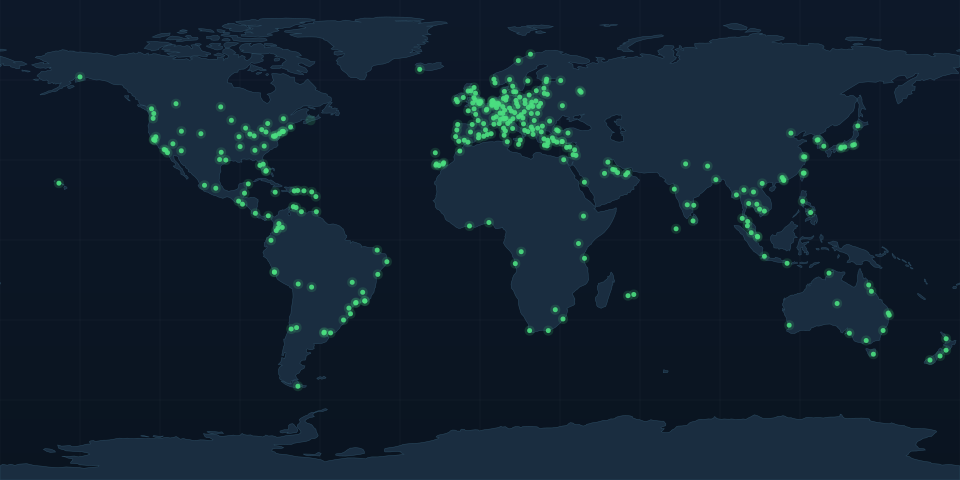
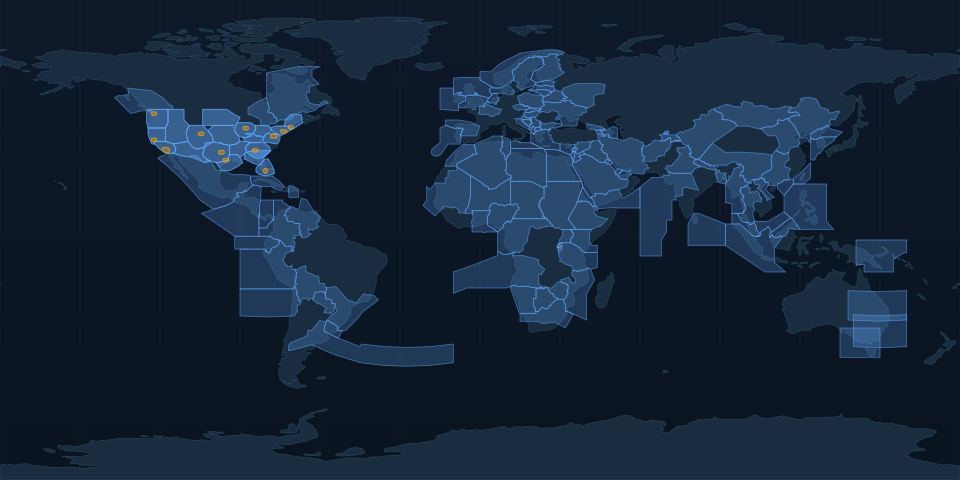
190+ airspaces
One airspace is a demo. 190+ covering the world is a product. The data pipeline to generate them was its own project.
US airspaces use FAA NASR data, the official database of waypoints, navaids, airways, and boundaries. International airspaces use OurAirports navaid data and manually defined boundaries based on ICAO FIR maps.
The scripts parse raw FAA CSVs, extract VORs and NDBs near each boundary, compute entry/exit points from navaid positions, and generate the JSON the simulator loads. Each airspace has real waypoint names. JFK VOR, the MERIT intersection. Not made-up five-letter codes.
Entry and exit point placement matters for realism. Traffic entering New York Center should come from the direction of Boston Center via waypoints that actually exist on the boundary. The scripts sort candidate navaids by distance to the boundary and pick ones that create realistic flow patterns.
The pipeline also generates US TRACON airspaces: N90 (New York), C90 (Chicago), SCT (SoCal). These are the high-workload approach positions where sequencing is everything.
Ground control
This nearly broke me.
Everything before was radar: dots on a map, abstract. Ground control is visual. You’re looking at an actual airport from above, with runways, taxiways, gates, aircraft taxiing. Every pixel matters.
Airport data
I needed surface data for hundreds of airports. Every taxiway, gate, hold line, runway intersection. No single free source has all of it.
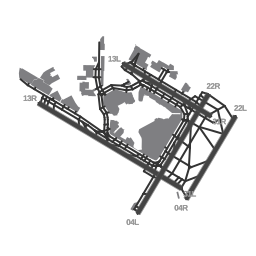
The pipeline pulls from OpenStreetMap via the Overpass API. OSM has surprisingly good airport data. Volunteers have traced taxiway centerlines, marked gates, labeled designators for major airports worldwide. The scripts fetch this, parse the geometry, build a graph of connected taxiway nodes, and output structured surface definitions.
Per airport: runway positions and dimensions, taxiway centerlines as graph edges, gate positions with approach headings, hold short lines at runway intersections, apron areas and terminal outlines.
This runs for 321 airports. Each needed validation. Does the taxiway graph actually connect? Are gates reachable? Are hold lines placed right? I wrote scripts that check connectivity and flag issues, but plenty of airports needed manual fixes where OSM data was incomplete or just wrong.
Binary format
321 airports of JSON surface data is big. Raw JSON was over 50MB. Too much to load on demand. I designed a binary format called RCSF (RadarControl Surface Format) that gets roughly 6-7x compression vs JSON. Encoder runs at build time, decoder runs in the browser. Individual airport load times drop to under 100ms.
Rendering
The ground radar is a 7-layer SVG pipeline:
- Airport outline and apron areas
- Runway surfaces
- Taxiway surfaces (filled polygons)
- Taxiway centerlines
- Runway markings (threshold, centerline, designators)
- Hold short lines
- Gate positions and labels
Each layer renders at the right zoom level. Zoomed out: airport outline and runways. Zoomed in: gate numbers and taxiway designators. Getting the visual hierarchy readable at every zoom level took more iterations than I expected.
Aircraft render to scale. A 737 is smaller than a 747, which is smaller than an A380. Symbols rotate to show heading. Watching a line of aircraft taxi from gates to the runway, properly spaced, each the right size: that’s when the sim feels alive.
Taxi routing
Ground movement uses A* pathfinding on the taxiway graph. Tell an aircraft to taxi to runway 31L and the system finds the shortest path, respecting one-way restrictions and runway crossings.
Taxi speeds matter. About 20 knots on straight taxiways, 10 for turns. Aircraft stop at hold short lines and wait for clearance. A 747 doesn’t turn on a dime.
Pushback models the aircraft backing out of the gate, turning to face the right direction, stopping when clear. Direction depends on gate orientation and the desired taxi route.
Safety
Collision detection flags aircraft that are too close on the taxiway. Runway incursion detection catches aircraft entering active runways without clearance. Gridlock detection finds situations where aircraft have boxed each other in with no way out. Happens more often than you’d think on complex layouts like JFK or O’Hare.
These don’t prevent mistakes. They show you when you’ve made one. The scoring system deducts accordingly.
Scoring and ranks
You start as an Observer and progress through eight tiers up to Air Traffic Manager. Sessions earn points for aircraft handled, separation maintained, and efficiency.
Student Controller takes a few sessions. Air Traffic Manager takes hundreds of hours. Each rank unlocks new airspaces and airports.
What I’ve learned
Browsers are underestimated. WebAssembly, WebGL, Web Audio, Web Workers. The modern browser is a real application platform. Zero-install is a genuine advantage over native apps.
Data is the moat. 190+ airspaces and 321 airports represent months of pipeline work, validation, and edge cases. The engine matters, but the data is what makes it feel complete instead of like a tech demo.
Realism is fractal. Add one realistic behavior and it exposes three unrealistic ones. Wind effects reveal that ground speed varies, which reveals spacing calculations are wrong, which reveals the sequencing logic needs rework. There’s no “done” with a simulator.
Performance work is invisible. WASM migration, binary surface format, memory leak hunting. Users never see any of it. But if it was missing, the experience would feel sluggish and they’d leave without knowing why.
What’s next
Multiplayer is the most requested feature and the hardest technical challenge. Controlling the same airspace with another player, handing off between sectors. More approach procedures, more realistic traffic, maybe voice recognition. The roadmap goes deep.
The simulator is free at radarcontrol.io. Open it, pick an airspace, try to keep the planes apart. It’s harder than it looks.
For command reference and documentation, visit docs.radarcontrol.io.